888 206 4377
 Email
888 206 4377
Email
Email
888 206 4377
Email
The delivery price is calculated during checkout based on your location and the goods ordered. Our basic delivery prices are:
Delivery within USA: $40.00
Delivery Service: Five working days*
* For products that are in stock and the order received by midday.
Some products go through a final configuration and calibration before being shipped. If the calibration labs are busy this can add up to two days on to the delivery schedule but guarantees a fresh calibration.
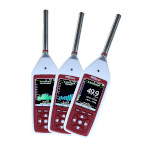
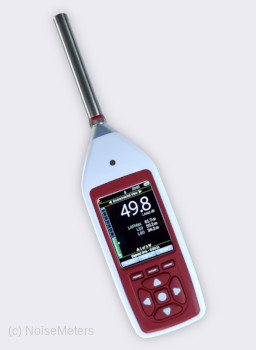
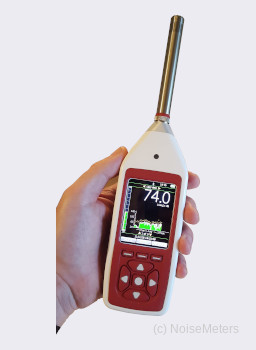
The Optimus range of meters measure all parameters at the same time, so there is no need to spend time figuring out if you have the meter set up correctly before starting a measurement.
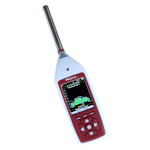
The Optimus Environmental sound level meter is available as either Type 1 or Type 2 - the most common for environmental noise measurement and more accurate being Type 1. This meter also has everything needed for occupational noise measurement in line with the Noise at Work regulations, making it ideal for anybody involved in both environmental (outside the factory) and occupational (inside the factory) noise.
If the meter is to be left unattended in poor weather conditions then the optional Outdoor Kit should be used to offer protection against the elements.
The Outdoor Kit also includes a large rechargeable battery pack for at least seven days of monitoring.

Most environmental noise surveys demand the use of a Type 1 Sound Level Meter that can make repeating measurements, such as the 5 minute LAeq and L90 (background noise).
We recommend the Type 1 Optimus Environmental with Data Logging in a Noise Measurement Kit, order code CK1710). Most regulations demand the use of a suitable Calibrator, which is included with this kit.
If there is any tonal content to the noise, or if you just need to make an analysis of the frequency content, please see:
Optimus sound level meters can be supplied alone or as part of a noise measurement kit.
If your application does not require the use of a calibrator, or if you already have a suitable calibrator then the sound level meter can be bought on its own. In this case you will receive the sound level meter, windshield, NoiseTools software and calibration certificate.
However, most regulations state that you should use a sound level calibrator to check the function of the sound level meter before and after making noise measurements.
The "Noise Measurement Kits" listed on this page include everything you need for most applications. The order code for a kit begins with "CK" and includes:
The Optimus Environmental sound level meter is capable of measuring the noise parameters required for most environmental noise surveys. It is ideal for both short term and longer term measurement when installed in a weatherproof outdoor kit.
The main noise measurement parameters are:
To keep things sensible, the meter displays just the main parameters (Leq, Ln, etc.) on its display. However, it simultaneously measures all installed parameters, so you can sure of missing nothing. These parameters can be viewed on the display or, more usefully, after download.
The acoustic parameters stored can be logically separated into two groups:
1. Periodic Summary
Whenever you press Start and then Stop, you get a summary of the noise. For environmental surveys, the Start/Stop process is usually run automatically, repeating every 15 minutes for example. The summary typically consists of the following parameters describing the noise in detail:
2. Time History
On top of the summary data above, the meter continually stores a number of parameters, typically every second, but the rate can be between 10ms and 2 seconds. When downloaded to a computer, this gives a detailed and very useful graph of the noise levels over time.
Although the Time History is not usually a requirement of the regulations, it is extremely useful when presenting a picture of the noise. It also offers the ability to zoom in on different times of day and recalculating the Leq for other time periods.
The audio recording feature is included with the Optimus Environmental sound level meter. If you choose to enable it the meter make a recording of the audio during the measurement. It's uses are:
The audio is stored along with the measurement, making playback and analysis more convenient. Depending upon the way you want to use the recording there are three levels of recording quality:
Audio recording can be started manually by pressing a key or it can be triggered automatically based on the level and duration of noise events.
The quickest way is to take notes about a measurement is to make a brief recording just before making a measurement. The VoiceTag stays with the measurement when it is transferred to the computer. The VoiceTag feature is included with all versions of the Optimus Environmental sound level meter.
)
Before starting a measurement, the meter will ask if you want to record a "VoiceTag". The meter will record any speech or the noise in question (to help you identify it later) for up to 30 seconds. This audio is transferred to the software automatically along with the measurement.
You can skip this stage if you don't need a voice tag, or the option can be disabled altogether.
When viewing the measurement on a computer the Play Voice Tag button lets you listen to the recording on the computer's speakers.
The Environmental version of the Optimus Sound Level Meter is ideal for almost any type of noise measurement, but it has been optimized for Environmental Noise Surveys. It provides all the parameters and features that are usually needed, and of course it meets the very demanding acoustic standard IEC 61672 to Class 1.
The following features are available with this meter, all designed to make the acoustic measurement process quicker, easier and more accurate:

Most regulations and measurement standards state that the meter's calibration should be checked before making measurements.
Fit the Calibrator over the microphone as shown on the right, switch it on and press the Calibrate button. The meter will automatically make any adjustments.
Calibration details are stored in the meter so that you can either make note or download them to a computer if you have the data logging option.
Press the Start key, shown on the right to begin the measurement process. If you have the data logging option fitted then the meter will ask if you want to make a Voice Tag recording.
The meter will start measuring the LAeq and other parameters that are needed for environmental noise surveys.
When you are happy that you have measured for long enough simply press the Stop key.
The meter can record the audio - so you can listen to the actual sound later. Audio recordings can be started manually or when a trigger level is exceeded.
To start a recording manually press the Audio button during a measurement.
The Audio Recording can be set to start automatically when a certain level is exceeded. For example, you can set it to make a recording when the level exceeds 65dB(A). You can even set it to trigger when the trigger level is exceeded in just one band to detect tonal noise. Adjustable smoothing factors are available to avoid triggering on very short term noise.
For many environmental noise surveys, you need periodic (usually 5 minute, 15 minute or 1 hour) measurements showing values such as the Leq and the L90.
To make this type of measurement, use the Menu key to set the meter to make repeating measurements of the required duration. The meter will now run for the specified period. It will then stop, store the results and start again automatically.
It is better to mount the meter on a tripod for this type of measurement. A tripod mount is included on the back of the meter. It can be fitted to a standard camera tripod, or we can provide you with a suitable one.
The meters on this page include the NoiseTools software - there is no extra charge for this. You can download the software to evaluate it before making a purchase.
The NoiseTools software runs on a Windows PC. It is compatible with all recent versions of Windows, from Windows 7 onwards.
The Optimus is already optimized for environmental noise surveys and so is adequate for most surveys without any additions.
The following decisions do need to be made
The most important of the accessories is the Calibrator. Most regulations state that you should use one to check the function of the meter before making any measurements.
A Type 1 sound level meter is a little more accurate than a Type 2 model. It is also more expensive. For most environmental noise measurements we recommend the use of a Type 1 meter, which gives better performance at higher frequencies and certainly looks better when presenting the results for legal purposes.
If you want a bit more information then please visit our FAQ page about Class / Type.
The Noise Measurement Kits, order codes beginning CK..., include a sound level meter, calibrator of the correct class, software, carrying case and download cable. As a calibrator is generally needed for environmental noise, the Noise Measurement Kit is the most common way to buy the Optimus.
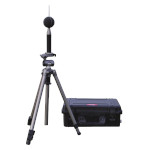
The Optimus Outdoor Noise Measurement Kit is ideal when you need to leave the meter unattended in poor weather conditions. The sound level meter itself is not weatherproof and will be damaged by rainfall.
The Outdoor Kit includes a weatherproof carrying case, outdoor microphone system and a battery pack to offer at least seven days of measurement. An optional extra battery pack will give up to fourteen days of noise measurement.
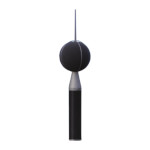
If you need to measure outdoors but can mount the sound level meter indoors, or in a weatherproof enclosure with power, then the MK172 Outdoor Mic option adds this ability to this model sound level meter. It comes with a 32ft microphone extension cable and can be mounted on a tripod or mast.
With the standard microphone fitted, the Optimus will measure up to 140 dB (143 dB Peak). While this is adequate for almost all applications, there are occasions when it is necessary to go higher. Measuring gunshot and even extreme car sound systems can need more than the usual 140 dB limit.
With the MV200EH High Level Noise Mic System the Optimus can measure up to 170 dB.
| Standards | IEC 61672-1:2013 Class 1 or Class 2 |
| IEC 61672-1:2002 Class 1 or Class 2 Group XIEC | |
| IEC 60651:2001 Type 1 I or Type 2 I | |
| IEC 60804:2000 Type 1 or Type 2 | |
| IEC 61252:1993 Personal Sound Exposure Meters | |
| ANSI S1.4 -1983 (R2006), ANSI S1.43 - 1997 (R2007) | |
| ANSI S1.25:1991 | |
| Measurement Range | 20dB to 140dB RMS Single Range |
| Noise Floor | <18dB(A) Type 1, <21dB(A) Type 2 |
| Frequency Weightings | RMS & Peak : A, C, & Z Measured Simultaneously |
| Time Weightings | Fast, Slow & Impulse Measured Simultaneously |
| Memory | 8GB with 32GB factory fit option |
| Time History | 10ms, 62.5ms, 125ms, 250ms, 1/2 sec, 1 sec, 2 sec |
| VoiceTag Audio | Up to 30 seconds of audio notes with each measurement |
| Bluetooth | BLE compatible with Android and iOS devices. |
| Mobile applications available from Google Play and the App Store | |
| Audio Recording | Off, Manual, Threshold Triggered, Advanced Trigger |
| Studio Quality - 96kHz/32bit WAV format | |
| High quality - 48kHz/24bit WAV format | |
| Standard quality - 16kHz/16bit WAV format | |
| Pre-Trigger function | |
| Integrator Quick settings | EU, OSHA HC & OSHA NC, OSHA HC & ACGIH, MSHA HC & MSHA EC |
| Ln Statistical Values | 14 independent statistical Ln values calculated from 1/16th LAF |
| 7 preset to L1.0, L5.0, L10.0, L50.0, L90.0, L95.0 & L99.0 | |
| Measurement control | Manual, 1 min, 5 min, 10 min, 15 min,30 mins, 1 hour, Lden |
| Automatic Synchronization & Repeat | |
| Pause & Back Erase with user selectable duration | |
| Dimensions | Size: 283mm x 65mm x 30mm |
| Weight: 300gms/10oz | |
| Power | Battery: 4 x AA Alkaline |
| Typically 12 hours with Alkaline AA | |
| Typically 20 hours with Lithium AA Non-Rechargeable | |
| Connections | USB Type B to PC |
| AC & DC Output via ZL:174 (2 x Phono, 1m) | |
| Multi-pin IO for external power via ZL:171 cable (2.1mm socket) | |
| External Power: 5v-15v via MultiIO socket via ZL:171 cable (2.1mm socket) | |
| Case | Material: High Impact ABS-PC with soft touch back & keypad |
| Tripod Mount | 1/4" Whitworth socket |
| Environmental | Temperature: Operating -10°C to +50°C, Storage -20°C to +60°C |
| Humidity: Up to 95% RH Non Condensing | |
| Electromagnetic | IEC 61672-1:2002 & IEC 61672-2:2003 |
| IEC 61672-1:2013 & IEC 61672-2:2013 | |
| Except where modified by EN 61000-6-1:2007 & EN 61000-6-1:2007 | |
| Language options | English, French, German, Spanish. |
| Displayed Functions | LXY, LXYMax, LXYMin, LXeq, LCPeak, LAPeak, LZPeak, LCeq-LAeq, LXE, LAIeq |
| Graph of Short LAeq, LCPeak | |
| Integrators 2 & 3: TWA, Dose%, Est Dose% | |
| Measurement Run Time | |
| 14 Statistical Ln values | |
| Stored Functions | LXYMax & Time History of LXYMax |
| LAeq, LCeq, LZeq, LCPeak, LZPeak, LAPeak, LAIeq | |
| Time History of LAeq, LCeq, LZeq, LCPeak, LZPeak, LAPeak, LAIeq | |
| Integrators 2 & 3: Lavg , TWA. %Dose | |
| Time History of Lavg | |
| Ln Values: 14 independent statistical values | |
| Audio recording during measurement | |
| where x=A ,C ,Z; y= F, S, I |
 Cart
Cart
)
)